Hit record
Get a transcript, translation, and summary
Online Voice Recorder is a Chrome extension that records your microphone and any tab's audio, then turns it into text you can copy, translate, summarize, and share.
Three sources, one button
Choose what to capture before you hit record. The same button starts all three.
Your microphone
Voice memos, dictation, a quick note to yourself. Press record and talk.
Any tab's audio
Record a call or a lecture playing in any tab. Capturing the tab does not join the call, and nothing announces itself to the other people in it.
Both at once
Your voice and the meeting together, mixed into one recording. Set the balance of the two in Settings so neither side gets buried.
Share to any device with a QR code
Send a recording, a transcript, or a summary to your phone or to someone else. They scan the code and open it, with no app to install.
Share audio, a transcript, or a summary, up to 100 MB.
Encrypted end to end. The key lives in the link, never on our server.
The link expires after 15 minutes on its own.
Built so you can't lose a recording
Recording is the one thing that should never fail quietly. This one is written to survive the bad moments.
- It saves to disk while you record, not only when you stop.
- It recovers after a crash or a browser restart, automatically.
- Finished files land in your Downloads folder, where you can find them.
A live transcript while you record
Speak and watch the words appear. When you stop, the whole transcript is already on your clipboard.
The text fills in as you talk, so you can read along.
Every segment is timestamped, and the finished transcript copies itself when you stop.
Export it to plain text or Markdown, in any of 16 languages.
Transcription runs on a secure cloud service. Only the audio you choose to transcribe is sent.
Translate into 20 languages
Turn a finished transcript into another language in one step, and play the original while you read along.
Translation runs on a secure cloud service and is not used to train anyone's models.
A summary that reads like notes
Turn any recording into a structured summary, ready to skim. It opens in the built-in reader.
Headings and key points, drawn from the whole recording.
Export it to Markdown or Word, or share it with a link.
Read it in focus mode, auto-scroll, or one word at a time.
Summaries are generated by a secure cloud service that does not train on your text.
Every recording in one place
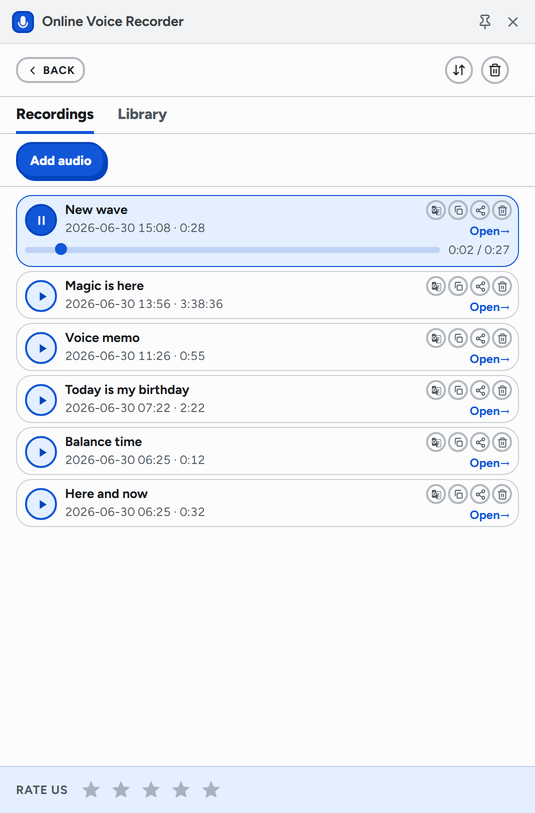
The side panel keeps your recordings next to whatever you are doing. Search them, play them, and open any one to read or edit its transcript.
Search across titles and transcripts.
Play, copy, share, translate, or trim straight from the row.
Star the ones you want to keep close.
The rest of the toolkit
Small features that add up: edit, read, share, and the recording details that keep it dependable.
- Trim a recording to any length, losslessly.
- Cut the silent gaps in one pass.
- Twelve voice effects, from chipmunk to cathedral.
- Focus mode, an auto-scroll teleprompter, or one word at a time.
- Bookmarks, and a reader that closes itself when you reach the end.
- Import and read EPUB, DOCX, TXT, Markdown, and FB2.
- Playback speed, ten-second skips, and a global hotkey.
- An auto-stop timer, from five minutes to a custom length.
- Crash recovery and drag-and-drop import of audio files.
Local recording, free cloud transcription
No account, no ads, no sale of data. Here is exactly what stays on your computer and what leaves it.
Recording, the library, editing, and reading stay on your computer. Finished audio saves to your Downloads folder.
Transcription, translation, and summaries run on a secure service (Cloudflare, Deepgram, OpenAI). Only the audio or text for that step is sent, and it is not kept long term.
No accounts, no ads, no profiles, nothing sold. Shared links are encrypted and expire in 15 minutes.
Full details are in the privacy policy.
Questions, answered
Is it really free?
Where are my recordings stored?
Does my audio go to the cloud?
Can it record a meeting or lecture from a tab?
What languages does it handle?
Do you show ads or sell my data?
Record something now
Add it to Chrome, click the icon, press Start recording. That is the whole setup.